

A two-hour YouTube lecture can be summarized in minutes with AI. But what if you need to revisit a specific explanation, understand a diagram, or organize an entire course into study notes?
That's where AI video summarizers start to differ.
NoteAi, NotebookLM, NoteGPT, and BibiGPT all help users process information faster, but they approach video learning, research, and knowledge management in different ways.
This comparison looks beyond basic summaries to explore batch processing, visual notes, interactive transcripts, AI podcasts, and how each tool helps you reuse what you've learned.
Quick Answer: Choose NoteAi for video-first learning, with batch processing, PPT key frames, Quick Highlights, timestamped transcripts, interactive Mind Maps, and a personal knowledge base. NotebookLM is better suited to research across documents and YouTube transcripts. NoteGPT focuses on batch summarization and AI creation tools, while BibiGPT is a strong option for cross-platform video analysis and content repurposing.
1. NoteAi vs NotebookLM vs NoteGPT vs BibiGPT: Quick Comparison
All four tools can generate AI summaries. The more useful question is what happens after the summary is created.
| Tool | Best For | Key Strength |
|---|---|---|
| NoteAi | Video learning and knowledge management | Batch processing, Visual Notes, Smart Sync |
| NotebookLM | Multi-source research | PDFs, YouTube transcripts, cited AI answers |
| NoteGPT | Batch summaries and AI creation | Multi-video processing, transcripts, AI tools |
| BibiGPT | Cross-platform video research | 30+ platforms, visual analysis, content reuse |
For a quick overview of one YouTube video, several of these tools may be enough.
But when you're handling long lectures, technical demonstrations, interviews, or a collection of recordings, source navigation, visual information, editing, and export options become much more important.
Disclosure: This article is published by NoteAi. Product capabilities are compared using publicly documented features reviewed in October 2026, rather than a controlled test of transcription accuracy or processing speed.
2. NoteAi — Best for Video Learning and Reusable Knowledge
NoteAi is an AI video summarizer, AI note taker, and personal knowledge base designed for people who regularly learn from video and audio.
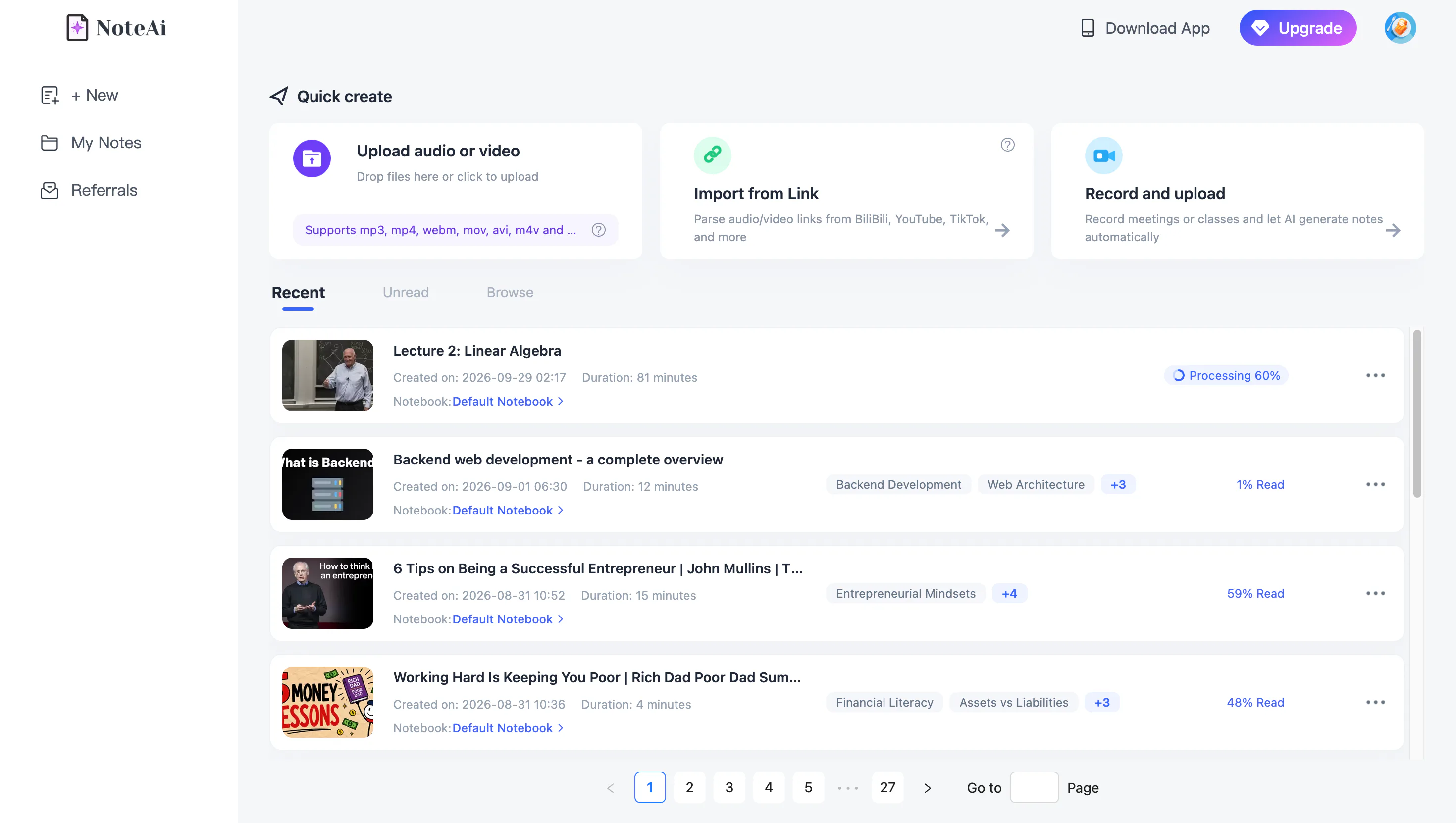
Its strength is the connected learning workflow. Instead of stopping at a short summary, NoteAi allows users to review transcripts alongside the original footage, capture important visuals, add personal annotations, and organize the results for future use.
Batch Process YouTube Videos and Recordings
NoteAi accepts supported video links from YouTube, TikTok, Bilibili, and other online platforms. Users can also upload local audio and video files or capture content through recording and screen-recording features.
It supports batch uploading, with up to 15 items per batch on eligible Max plans.
This is useful when you're organizing several lectures from the same course or analyzing a collection of interviews. You can process multiple sources and keep the resulting notes organized, rather than handling every video as an isolated task.
Start with Quick Highlights and Key Insights
A long lecture doesn't always need to be reviewed from beginning to end.
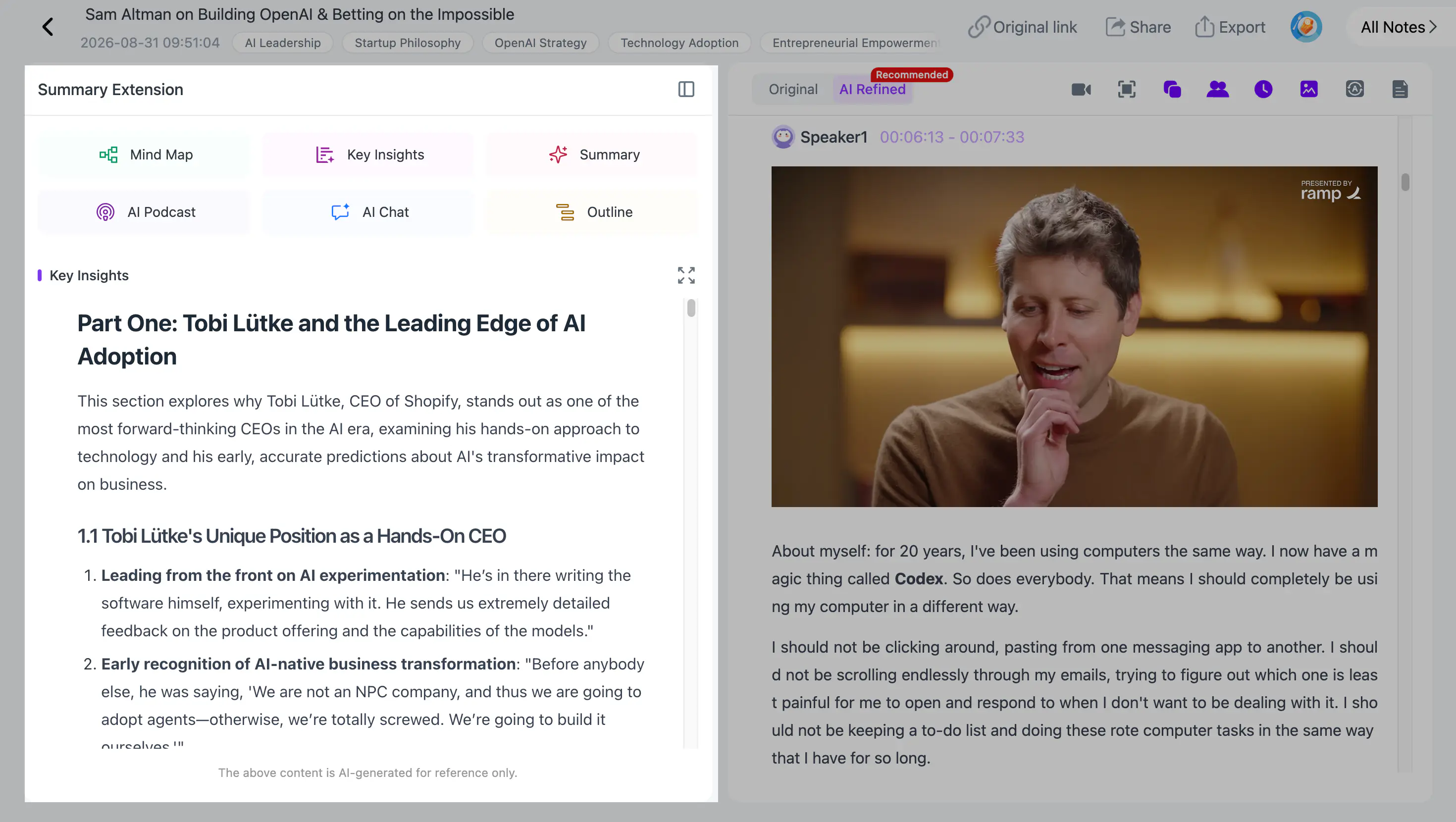
NoteAi's Quick Highlights helps users identify valuable sections, while Key Insights and AI summaries provide a structured overview of the main ideas.
You can scan the important topics first, then decide which explanations deserve a closer look.
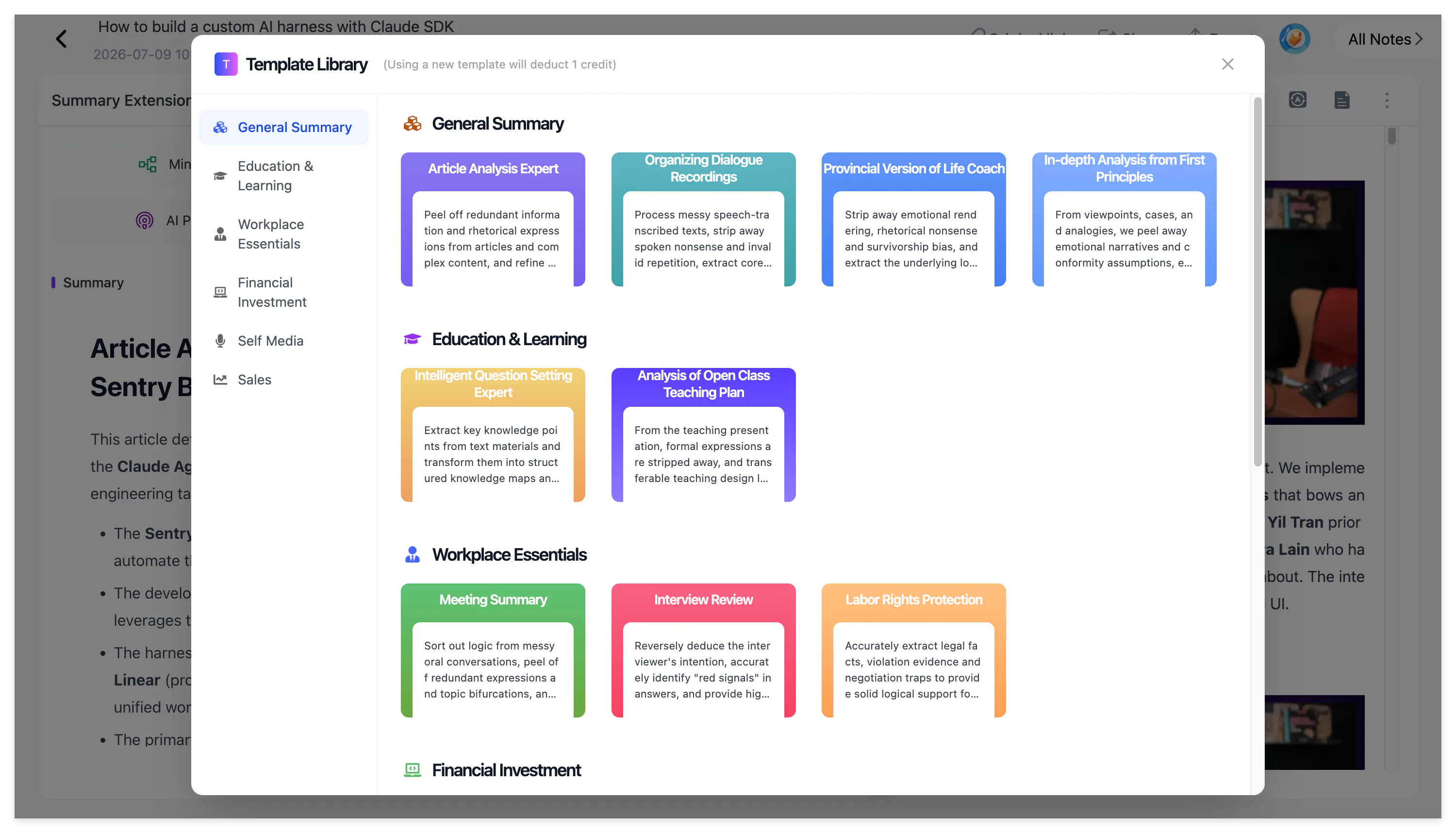
The same video can also be organized using different Summary Templates.
For example, a student might choose lecture notes or an exam-review structure, while a professional might prefer a meeting summary or action-item format. NoteAi also supports custom instructions for more specific learning and work requirements.
If you only need the main ideas from a short public YouTube video, the Free YouTube Summarizer provides an initial free Key Insights summary for eligible videos up to one hour.
Study with Timestamps, Mini-Player and Annotations
Generating notes is one thing. Actually studying from them is another.
NoteAi provides original and AI-polished transcripts with speaker identification and clickable timestamps. When you need to check a quotation or understand a specific explanation, you can jump directly to the corresponding section of the video.
The picture-in-picture mini-player keeps the original footage available while you read or edit the notes.
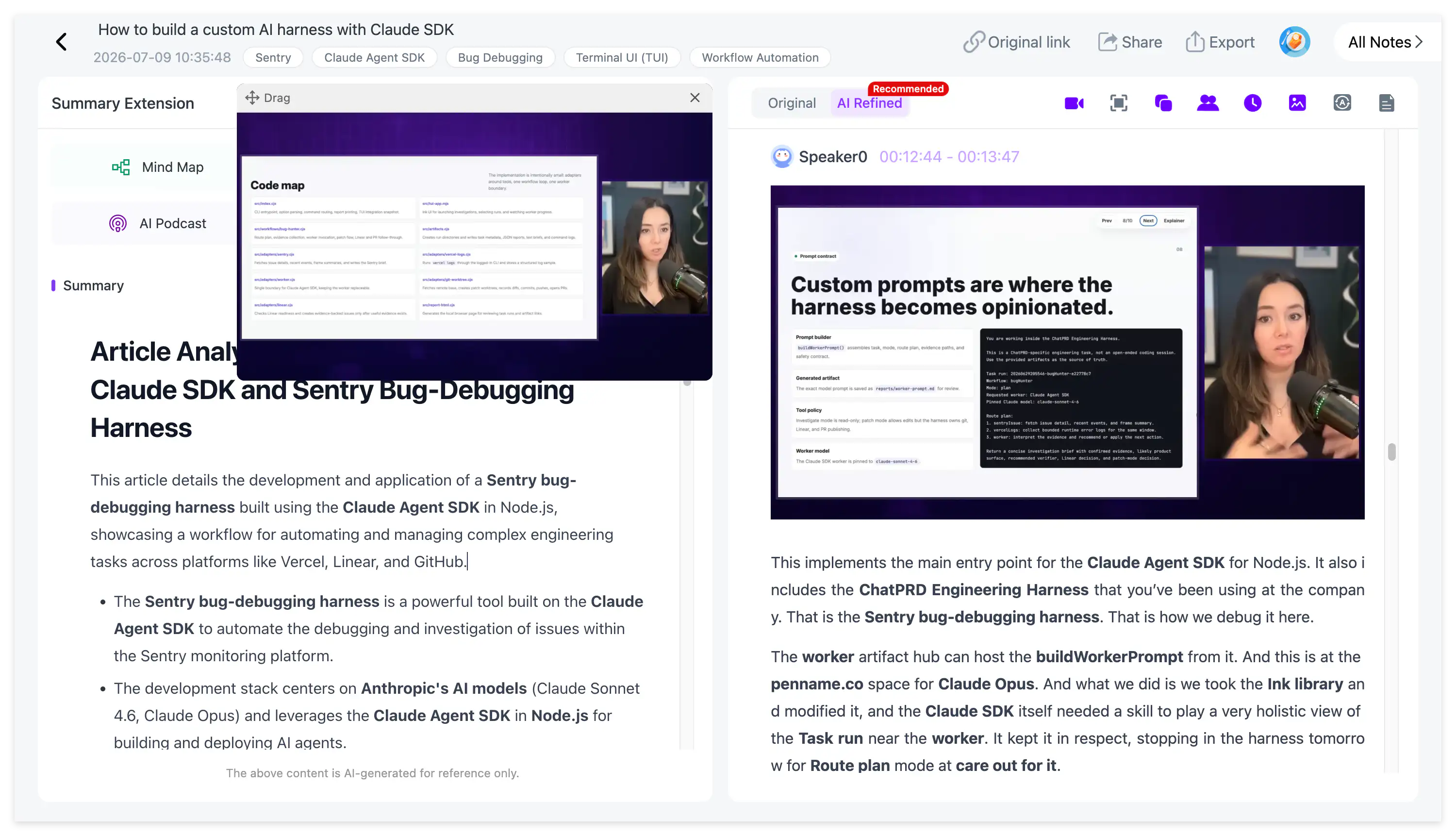
You can also highlight important passages, mark useful information, and add personal annotations.
For example, when reviewing a technical tutorial, you can keep the demonstration playing in a small window while marking the steps you want to remember.
This makes the experience more interactive than simply downloading a transcript and reading it separately.
Capture PPT Slides and Important Video Frames
Many educational videos contain information that isn't fully explained in speech.
A professor might refer to a formula on a slide. A coding tutorial may display important code, while a software demonstration may show steps that are difficult to describe through text alone.
NoteAi's Visual Notes extracts relevant PPT slides, diagrams, charts, and key video frames, keeping them alongside the corresponding explanations.
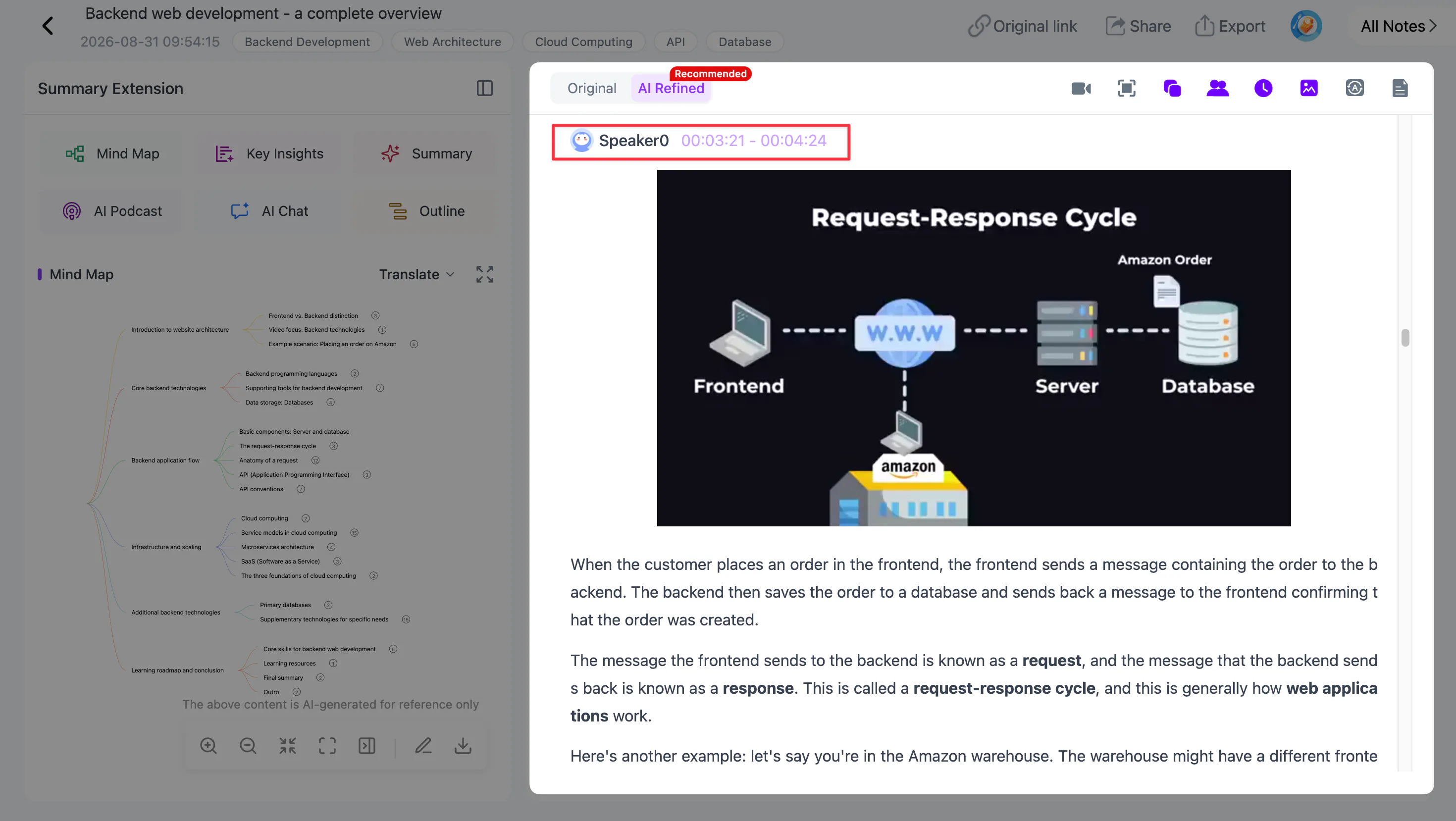
Instead of saving disconnected screenshots, users get illustrated notes that preserve more of the original learning context.
For a detailed walkthrough, read How to Extract Slides From YouTube Videos With AI.
Create Editable Mind Maps and Ask AI Questions
NoteAi can turn a processed video into an editable Mind Map, organizing the main ideas into topics and subtopics.
With Smart Sync, selecting a mind-map or outline node can return you to the corresponding section of the original video.
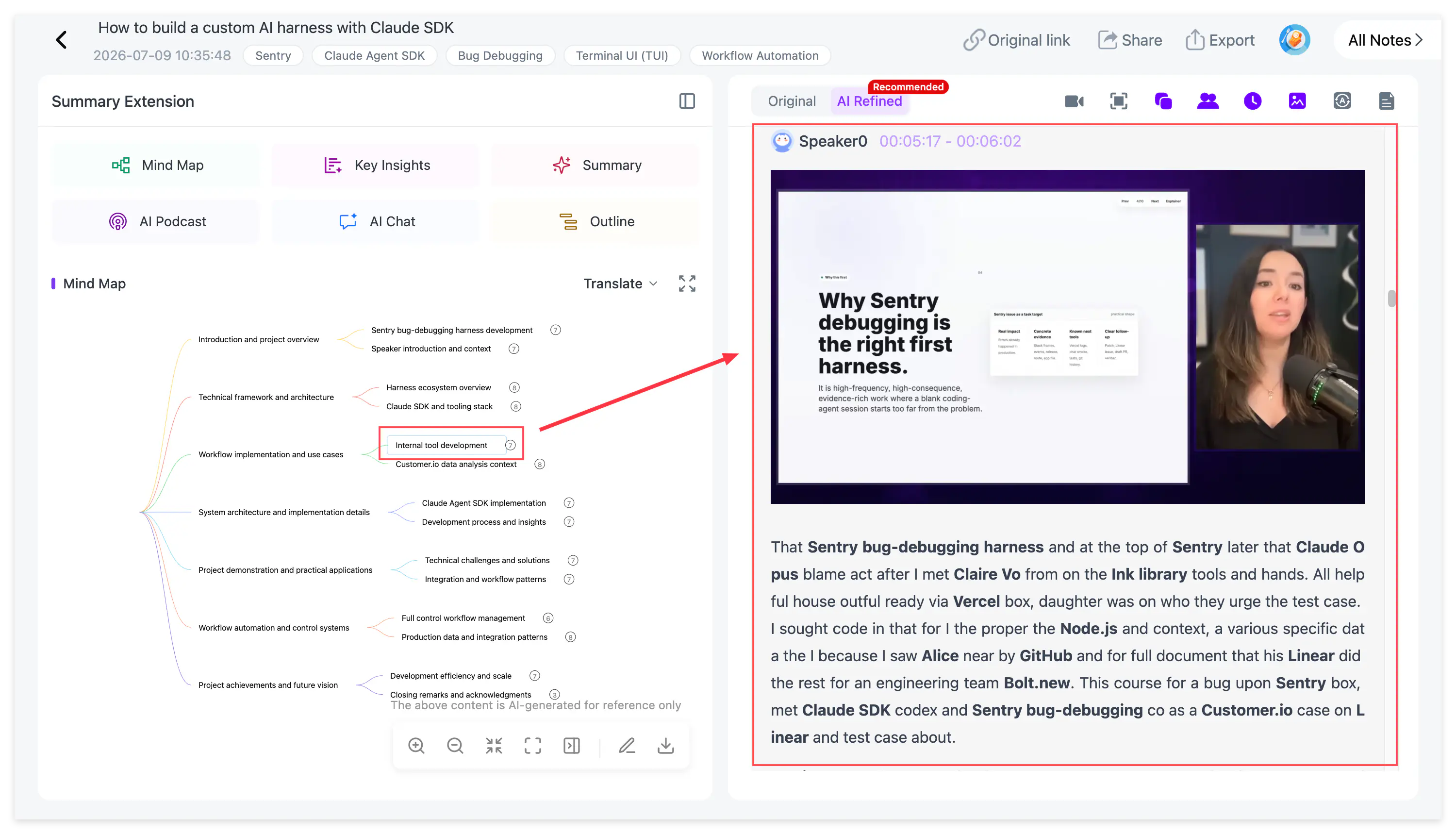
This is useful when a short summary reminds you of an idea, but you want to revisit the explanation before relying on it.
AI Chat provides another way to explore the material. You can ask follow-up questions, clarify unfamiliar concepts, generate review questions, or compare information across saved notes.
For foreign-language content, NoteAi also supports translation across 22 languages, including bilingual reading.
Generate AI Podcasts and Organize Your Knowledge
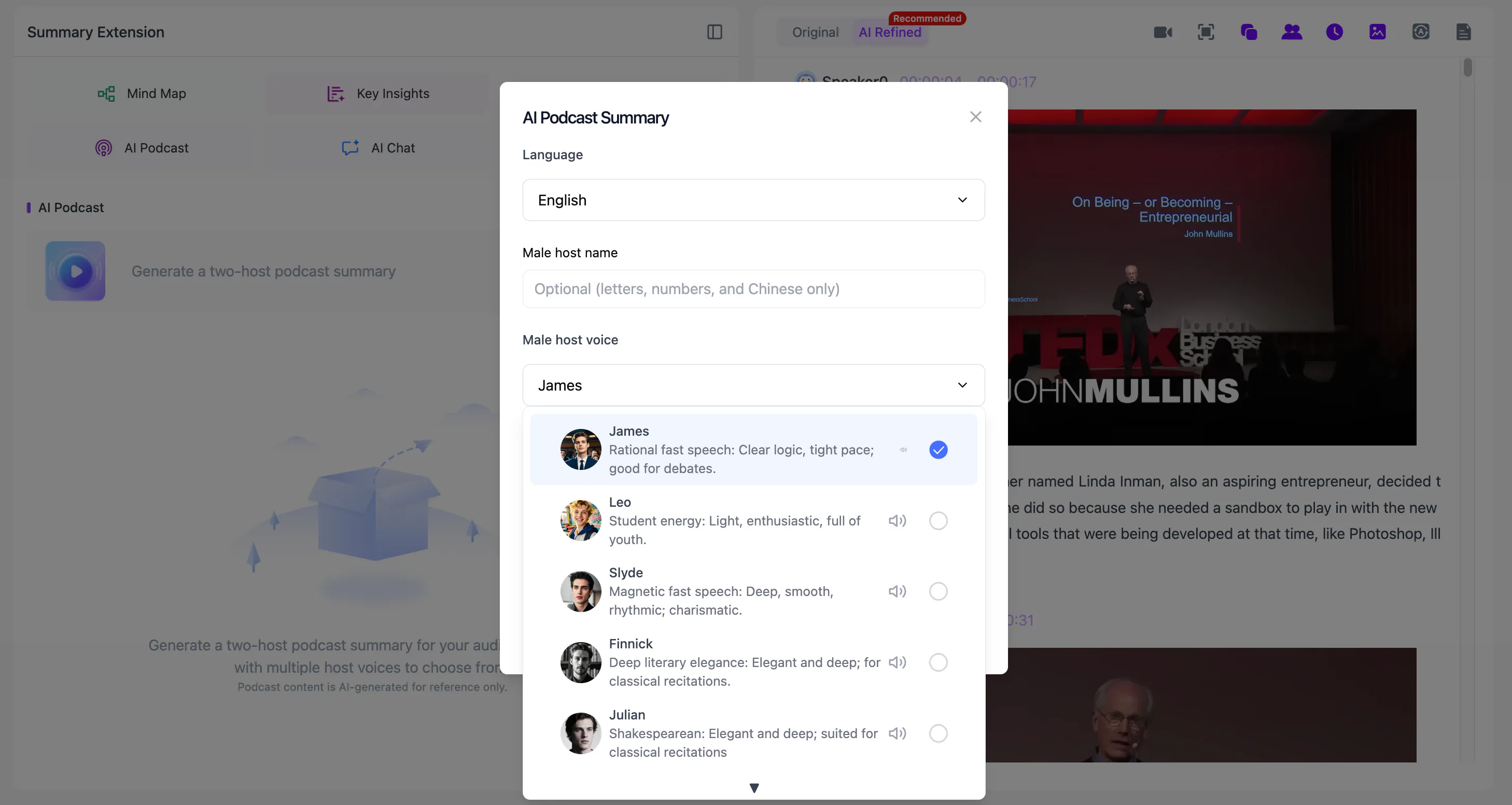
For people who prefer audio-based review, NoteAi can turn processed notes into a two-host AI podcast.
Users can customize speaker names and voice styles, with Chinese and English podcast output options. The resulting audio provides another way to revisit important ideas without reopening the full lecture.
Processed notes can be saved in NoteAi's personal knowledge base, organized into categories, and searched later.
They can also be exported as Word, PDF, Markdown, and HTML, or used in workflows involving Obsidian and Notion.
For an example of turning videos into lasting knowledge, see YouTube Video to Notes: A Smarter AI Note-Taking Workflow.
NoteAi Free and Paid Limits
NoteAi offers a free plan with 120 Credits, supporting individual files up to 2 hours and 2 GB.
Paid Max plans support individual files up to 7 hours and 4 GB, with larger credit allowances and batches of up to 15 items.
The maximum file duration is separate from the processing amount covered by available credits.
Best for: Students, teachers, researchers, and professionals who want batch processing, detailed video review, visual notes, and long-term knowledge management in one workflow.
3. NotebookLM — Best for Research Across Multiple Sources
Google NotebookLM is designed for research and learning across different source materials.
Rather than focusing primarily on videos, it allows users to combine PDFs, documents, webpages, audio sources, and supported YouTube transcripts inside one notebook.
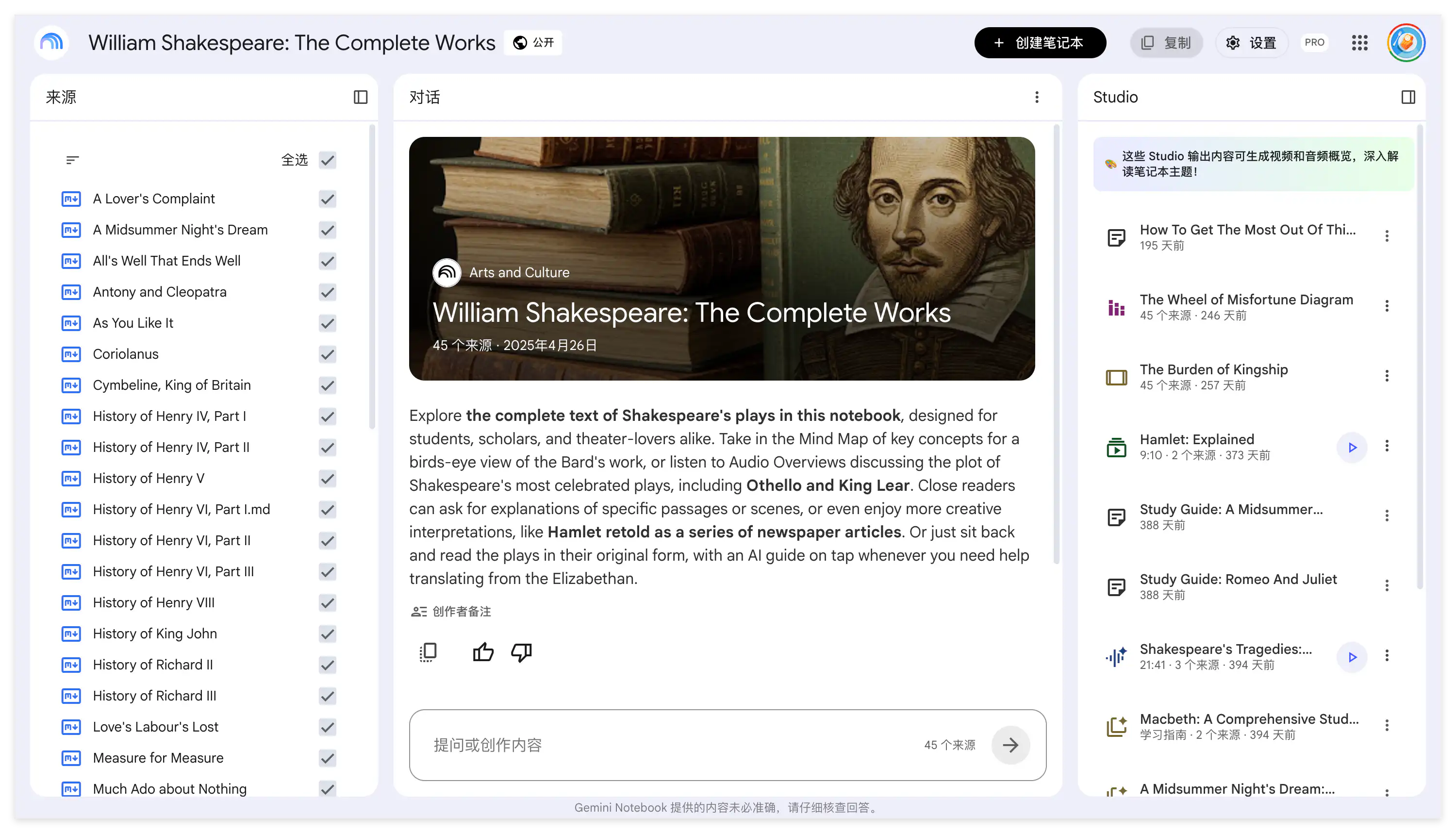
Combine YouTube Transcripts with Documents
NotebookLM supports importing public YouTube videos with accessible captions.
According to Google's official source documentation, its YouTube URL workflow imports the video's text transcript as a source.
This allows users to compare a lecture transcript with related academic papers, reports, or course materials.
However, importing the transcript doesn't automatically preserve the original video's PPT slides, diagrams, or visual demonstrations.
For a lecture where on-screen information is essential, that distinction matters.
Source-Grounded Answers and Audio Overviews
NotebookLM can answer questions about selected sources and provide citations to supporting material.
It also offers study guides, Mind Maps, Audio Overviews, and Video Overviews.
Google has expanded Audio and Video Overviews to more than 80 languages, making the platform useful for multilingual research and learning.
You can find more details in Google's official Audio and Video Overviews update.
Where NotebookLM Works Best
Imagine you're writing a research report using several academic papers, a PDF report, and a related YouTube lecture.
NotebookLM makes it easier to explore those sources together and identify where their information overlaps.
This is different from studying the original video with its slides, timestamps, annotations, and source-linked visual notes.
Best for: Researchers and students who need cited AI answers across mixed documents and YouTube transcripts.
For a more focused comparison, read NoteAi vs NotebookLM: Which Is Better for YouTube Learning?.
4. NoteGPT — Best for Batch YouTube Summaries and AI Creation
NoteGPT offers AI tools for YouTube summarization, transcription, Mind Maps, AI-powered questions, and content creation.
Its batch-processing features are particularly useful for people who regularly research multiple YouTube videos.
Summarize Multiple YouTube Videos
According to NoteGPT's official YouTube Video Summarizer, supported workflows can process up to 20 YouTube videos simultaneously.
The tool also advertises summarization for supported videos without subtitles and translation across more than 60 languages.
For users who need to screen a collection of tutorials or interviews, this can save time compared with handling each video manually.
AI Notes, Mind Maps and Audio Creation
NoteGPT offers more than simple text summaries.
Its wider product includes transcript extraction, Mind Maps, AI conversations, and podcast-related audio creation. Feature availability and processing limits depend on the selected workflow and plan.
This makes NoteGPT useful for users who move between video summarization, studying, and other AI creation tasks.
Where NoteGPT Works Best
NoteGPT is a strong option when your main task is quickly summarizing several YouTube videos and collecting their main ideas.
NoteAi also supports batch processing, so the distinction isn't simply whether a product handles multiple videos.
The more important question is what you want to do afterward: generate quick summaries, or continue into detailed video review, visual notes, annotations, Smart Sync, and a searchable knowledge base.
Best for: Users who frequently process multiple YouTube videos and want access to related AI learning and creation tools.
5. BibiGPT — Best for Cross-Platform Video Analysis
BibiGPT is an AI video and audio assistant with broad support for online media.
According to its official product overview, it covers more than 30 platforms, including YouTube, Bilibili, TikTok, Douyin, and Xiaohongshu.
It also supports local uploads, making it useful for people researching content from different platforms.
Video Summaries and Visual Analysis
BibiGPT generates timestamped summaries, transcripts, Mind Maps, and AI-powered conversations about processed content.
It also offers visual-processing features.
Its April 2026 product update introduced or expanded PPT key-frame extraction, hard-subtitle OCR, and screenshot analysis.
These features help users work with information displayed on screen, such as slides, charts, or text embedded in a video.
Some functions are available in beta or depend on the selected processing mode.
Content Repurposing and Knowledge Management
BibiGPT also supports turning video material into different written formats, including articles, social media posts, and presentation outlines.
For creators, this can help connect video research with publishing workflows.
BibiGPT also provides Notion and Obsidian integrations, so it would be inaccurate to describe it as lacking knowledge-management capabilities.
Where BibiGPT Works Best
BibiGPT is especially useful for people who regularly analyze videos from multiple social platforms and transform that information into new content.
It overlaps with NoteAi in several areas, including visual extraction, AI questions, Mind Maps, and external note-taking workflows.
The distinction is mainly in how the features are organized: BibiGPT emphasizes cross-platform content analysis and repurposing, while NoteAi focuses on a connected video-learning experience and reusable source-linked notes.
Best for: Creators, marketers, researchers, and knowledge workers processing content across different platforms.
6. The Key Differences in Real Workflows
Most feature comparison tables tell you whether a tool has a particular function.
But when several tools offer similar features, the workflow matters more than the checkbox.
| What You Need | NoteAi Workflow | Other Strong Options |
|---|---|---|
| Batch video processing | Up to 15 items on eligible Max plans, followed by organized notes | NoteGPT supports up to 20 YouTube videos in eligible modes |
| Preserve slides and visuals | PPT key frames within source-linked Visual Notes | BibiGPT also supports PPT extraction and screenshot analysis |
| Study while watching | Mini-player, timestamps, highlighting, annotations and Smart Sync | Other tools offer different transcript and playback experiences |
| Research across documents | Video knowledge base and cross-note questions | NotebookLM specializes in mixed sources and citations |
| Generate audio reviews | Two-host AI podcasts from processed notes | NotebookLM offers Audio Overviews; NoteGPT has audio tools |
| Reuse information | Markdown exports, Notion/Obsidian workflows and knowledge base | BibiGPT offers content repurposing and external integrations |
Scenario 1: Studying a Two-Hour Lecture
If the lecture contains PPT slides, diagrams, and software demonstrations, you may need more than a summary of the spoken words.
With NoteAi, you can start with Quick Highlights, inspect the Visual Notes, then return to the original explanation using timestamps or Smart Sync.
The mini-player and annotation tools make it easier to study specific sections while keeping your own observations.
BibiGPT is also worth considering because it supports PPT extraction and visual analysis.
NotebookLM is more useful when the lecture needs to be studied alongside PDFs, research papers, and other documents.
Scenario 2: Summarizing Multiple YouTube Videos
Both NoteAi and NoteGPT support batch processing.
NoteGPT advertises up to 20 simultaneous YouTube videos in supported modes, while NoteAi supports up to 15 items in eligible Max-plan batches.
If your goal is to screen many videos and collect short summaries, NoteGPT is a practical choice.
If you expect to revisit those sources, preserve their visuals, annotate important explanations, and keep everything organized for future learning, NoteAi offers a more connected workflow.
Scenario 3: Researching Videos for Content Creation
A creator collecting ideas from YouTube, Bilibili, and TikTok may care most about platform support and how easily the source material can become new content.
BibiGPT provides broad platform coverage and content-repurposing features.
NoteAi can also process multiple supported sources and organize transcripts, visual references, summaries, and related research inside a knowledge base.
The choice depends on whether you're primarily producing content from videos or building a longer-term collection of source material.
7. Which AI Video Summarizer Should You Choose?
Each tool is useful for a different kind of work.
| Your Main Goal | Recommended Tool | Why |
|---|---|---|
| Study lectures with PPT slides | NoteAi | Visual Notes and source-linked review |
| Research across PDFs and YouTube | NotebookLM | Multi-source analysis and cited answers |
| Process several videos into study notes | NoteAi | Batch processing and knowledge management |
| Summarize large YouTube collections | NoteGPT | Batch summaries and AI tools |
| Analyze videos from many platforms | BibiGPT | Cross-platform support and visual analysis |
| Turn video research into content | BibiGPT | Content-repurposing workflows |
| Review videos with annotations | NoteAi | Mini-player, timestamps, highlighting and Smart Sync |
If your work is document-heavy, NotebookLM may be the better fit. If you want to quickly summarize many YouTube videos, NoteGPT is worth considering.
For cross-platform video research and content creation, BibiGPT is a strong choice.
If you regularly study long-form videos and want the transcript, original visual information, personal annotations, AI-generated notes, and knowledge base to work together, NoteAi is particularly well suited to that workflow.
For more tools beyond these four, see 8 Best Free AI Video Summarizers in 2026.
8. Try NoteAi's Free Video and Audio Tools
If you're comparing AI video summarizers, you can start with a short video or recording before committing to a larger workflow.
NoteAi provides several dedicated tools:
- Free YouTube Summarizer: Paste a public YouTube link and generate Key Insights. The first eligible summary is free for videos up to one hour.
- Free Video to Text Converter: Upload a local video file and generate a timestamped transcript. The first completed transcription is free within the one-hour and 1 GB visitor limits.
- Free Audio to Text Converter: Convert supported local audio recordings into transcripts, with timestamps and optional speaker detection under the same initial visitor limits.
The Video to Text and Audio to Text converters are designed for local file uploads, not pasted YouTube URLs.
For batch processing, Visual Notes, interactive learning tools, and long-term knowledge management, use the complete NoteAi workspace.
Frequently Asked Questions
What is the difference between NoteAi and NotebookLM?
NoteAi is designed for video-first learning, combining transcription, Visual Notes, timestamps, annotations, Mind Maps, and a knowledge base.
NotebookLM focuses on research across mixed sources, including PDFs, documents, websites, and YouTube transcripts.
Can NotebookLM summarize YouTube videos?
Yes. NotebookLM can import public YouTube videos with available captions and summarize their transcripts.
However, importing a YouTube transcript is not the same as automatically preserving the original video frames.
Can NoteAi summarize multiple YouTube videos at once?
Yes. NoteAi supports batch uploads, with up to 15 audio or video items per batch on eligible Max plans, subject to available credits.
Users can continue turning processed videos into transcripts, summaries, Visual Notes, Mind Maps, and organized knowledge.
Can NoteAi and BibiGPT extract PPT slides?
Yes. Both products offer video-frame and presentation-slide extraction features.
NoteAi connects useful frames with related explanations in Visual Notes. BibiGPT offers PPT key-frame extraction and screenshot analysis, with availability depending on the feature and processing mode.
Which AI video summarizer supports AI podcasts?
NoteAi, NotebookLM, and NoteGPT all provide audio-generation features.
NoteAi can generate two-host study podcasts with configurable speaker settings and Chinese or English output. NotebookLM offers multilingual Audio Overviews, while NoteGPT provides podcast-related tools.
Does NoteAi support highlighting and picture-in-picture playback?
Yes. NoteAi supports clickable timestamps, speaker-aware transcripts, picture-in-picture playback, highlighting, and annotations.
These features allow users to review the original video while reading and editing notes.
Is NoteAi free to use?
Yes. NoteAi offers a free plan with 120 Credits and supports individual files up to 2 hours and 2 GB.
Paid Max plans support files up to 7 hours and 4 GB, with larger credit allowances and up to 15 items per batch.
The maximum supported file duration is separate from the processing time covered by credits.
Can I export NoteAi notes to Notion or Obsidian?
Yes. NoteAi supports Markdown export and workflows involving Notion and Obsidian, alongside formats including Word and PDF.
For a practical example, read How to Turn YouTube Videos Into Obsidian Notes With AI.
Final Verdict
NoteAi, NotebookLM, NoteGPT, and BibiGPT are all useful AI tools, but they serve different workflows.
NotebookLM is strong for research across documents and YouTube transcripts. NoteGPT provides convenient batch summaries and AI creation features. BibiGPT combines broad platform support with visual analysis and content repurposing.
For students, researchers, and professionals who regularly learn from videos, NoteAi brings more of the learning process into one place.
You can batch-process content, scan Quick Highlights, review the original video with timestamps and a mini-player, preserve important slides, highlight useful explanations, and save the results in a personal knowledge base.
The goal isn't simply to summarize a video faster. It's to make the information easier to understand, revisit, and reuse.
Try NoteAi Free — Turn Videos Into Visual Notes and Reusable Knowledge